
Cloud computing services sound technical until you realize how often you already use them. When you save a document in Google Drive, watch a movie on Netflix, join an online meeting, edit a Canva design, back up photos from your phone, run an online store, or log in to a business app from your browser, you are using the cloud in some form. In this comprehensive beginner’s guide, you’ll learn what cloud computing services are, how they work, and their importance.
The simple definition is this: cloud computing services let people and businesses use computing resources through the internet instead of owning and managing all the hardware and software themselves. These resources can include storage, servers, databases, networking, software, analytics, security tools, developer platforms, artificial intelligence tools, and complete business applications.
In plain English, the cloud lets you rent the technology you need, when you need it, without building the whole system from scratch.
That is why cloud computing has become so important. It helps small businesses use professional tools without having to buy expensive infrastructure. It helps developers launch products faster. Finally, helps companies store data, run websites, protect files, assist remote teams, and scale when traffic grows.
This beginner’s guide explains what cloud computing services are, how they work, the main service models, the benefits, the risks, and how to choose the right option.
What Are Cloud Computing Services?
Cloud computing services are technology services delivered over the internet. Instead of keeping everything on your personal computer or company server, you access resources hosted in data centers managed by cloud providers.
A cloud provider owns and operates large networks of servers. These servers can store files, run applications, process data, host websites, manage databases, deliver software, and support many other digital tasks. Customers access those resources online and usually pay based on the plan, users, storage, features, or usage.
This is useful because most businesses do not want to buy and maintain physical servers. Servers require space, security, cooling, maintenance, updates, backups, monitoring, and technical knowledge. Cloud computing moves much of that burden to the provider.
For a beginner, the easiest way to understand cloud services is to think of them as digital utilities. You do not build your own power station to turn on the lights. You connect to a service and pay for what you use. Cloud computing works in a similar way for technology.
How Cloud Computing Works
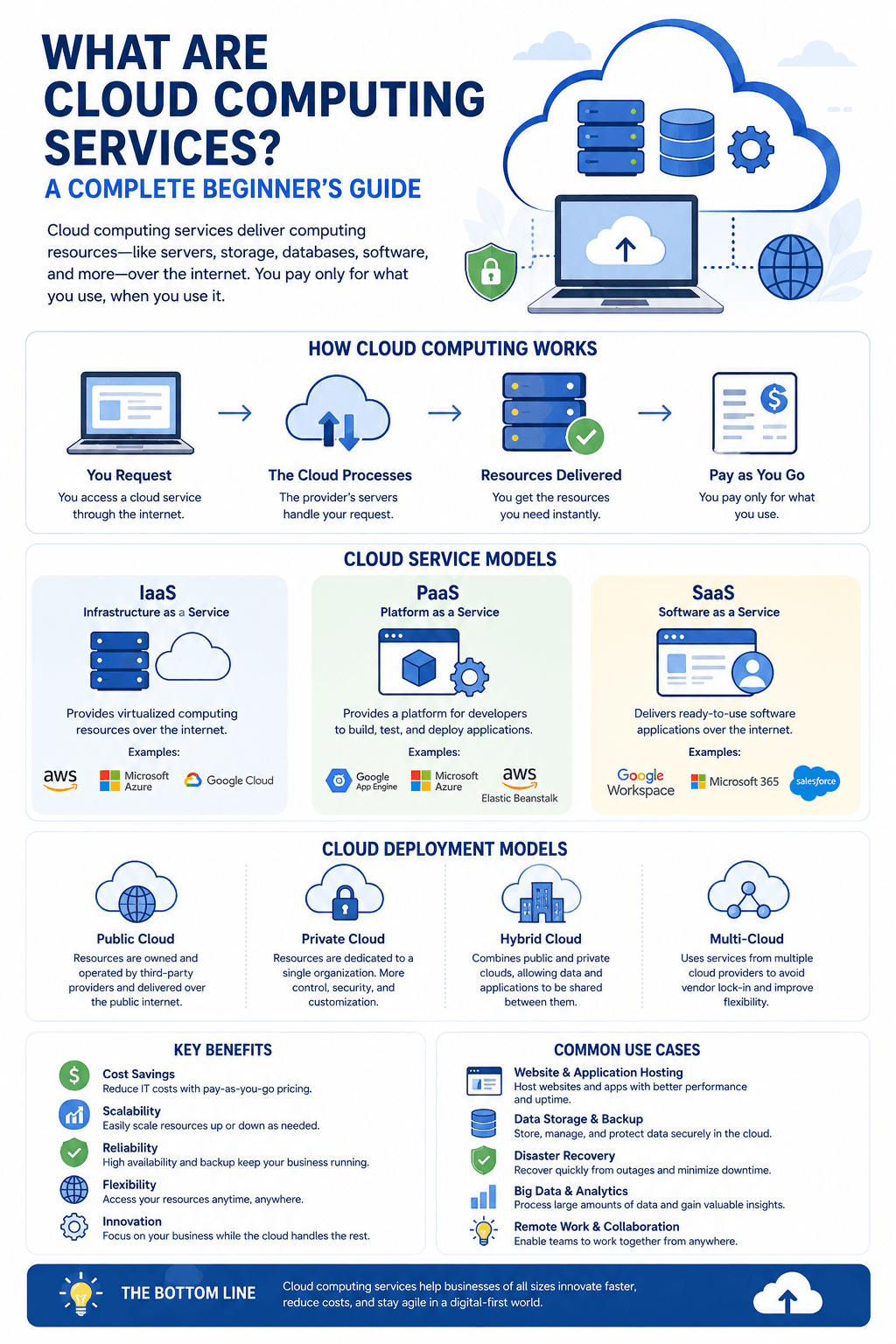
Cloud computing works by connecting users to shared computing resources through the internet. When you open a cloud application, upload a file, visit a cloud-hosted website, or run a business tool online, your device sends a request to remote servers. Those servers process the request and send the result back to you.
The user sees a simple interface. Behind the scenes, the cloud provider manages the infrastructure that powers everything.
This can include physical servers, storage systems, network equipment, operating systems, virtualization, security layers, monitoring tools, backup systems, and software updates. The customer does not usually need to see or manage all of that. They simply use the service.
Cloud computing is powerful because resources can be scaled up or down quickly. If a website gets more visitors, cloud infrastructure can often scale up to accommodate them. So, a team needs more storage, the plan can be expanded. If a company wants to test a new app, developers can create cloud environments without waiting for new hardware.
This pliability is one of the biggest reasons cloud services became popular.
Main Types of Cloud Computing Services
Cloud services are often grouped into a few major categories. The three classic models are IaaS, PaaS, and SaaS. Many people also discuss serverless computing because it has become increasingly important for modern apps.
| Cloud Service Type | What It Means | Best For | Beginner Example |
|---|---|---|---|
| IaaS | Infrastructure as a Service gives you cloud based servers, storage, and networking | Developers, IT teams, growing websites, and businesses that need more control | Renting a virtual server instead of buying a physical machine |
| PaaS | Platform as a Service gives developers a managed environment to build and launch applications | Software teams, start ups, and developers who want to build faster | Using a cloud platform to create and deploy a web app |
| SaaS | Software as a Service gives users ready to use software through the internet | Businesses and individuals who want simple online tools | Using Gmail, Dropbox, Shopify, Canva, Slack, or an online CRM |
| Serverless | Serverless lets developers run code without managing servers directly | Apps, automations, forms, payments, and tasks with changing demand | Running code only when someone uploads a file or submits a form |
| Managed Cloud Hosting | A hosting provider manages the cloud setup, updates, performance, and security basics | Website owners, bloggers, ecommerce stores, and small businesses | Hosting a WordPress website on a managed cloud hosting plan |
SaaS Explained
SaaS stands for Software as a Service. It is the most familiar cloud service model because most people use SaaS products every day.
With SaaS, you do not build or manage the software. You simply log in and use it. The provider handles hosting, updates, security, maintenance, and availability.
Common SaaS examples include email platforms, online accounting tools, customer relationship management software, design tools, ecommerce platforms, project management apps, video meeting tools, help desk software, and file storage apps.
SaaS is popular because it is easy to start. A small business can sign up for an app and use it the same day. There is no need to install complicated software on every computer.
The main thing to watch is subscription value. SaaS tools are convenient, but too many unused subscriptions can quietly increase costs.
Serverless Computing Explained
Serverless computing does not mean there are no servers. It means the user does not manage the servers directly. Developers write code, and the cloud provider runs that code when needed.
This model is useful for tasks that happen in response to events. For example, code may run when someone uploads an image, submits a contact form, clicks a button, or completes a payment.
Serverless can be efficient because businesses often pay only when code runs. It can also scale well during sudden demand. However, it still requires technical knowledge, so it is mostly used by developers and software teams.
Benefits of Cloud Computing Services
Cloud computing is popular because it solves practical problems. It helps organizations move faster, spend smarter, and stay flexible.
One major benefit is lower upfront cost. Instead of buying hardware before knowing exactly how much capacity is needed, a business can start with a smaller plan and grow over time.
Another benefit is scalability. If demand increases, cloud resources can often expand quickly. This is useful for ecommerce stores during sales, media websites during viral traffic spikes, apps during product launches, and companies with seasonal activity.
Cloud services also enable remote work. Teams can access shared files, dashboards, apps, and communication tools from different locations. That makes collaboration easier and reduces dependency on one physical office.
Security can also improve when cloud services are used correctly. Major providers invest heavily in data center protection, monitoring, identity tools, encryption options, and compliance resources. Still, security is shared. The provider protects the cloud infrastructure, while the customer must manage passwords, permissions, data practices, and account access.
Cloud computing also supports innovation. Firms can test new ideas faster because they do not need to wait for hardware purchases or long setup projects.
Common Cloud Computing Examples
Cloud computing appears in many everyday tools. Online storage services let users save and sync files. Streaming services deliver video through cloud infrastructure. Business apps manage sales, support, finance, content, and operations online. Website hosting platforms run sites on cloud servers. Developers use cloud platforms to build apps. Artificial intelligence tools commonly rely on cloud computing power to process large amounts of data.
For a small business, cloud computing might mean using Microsoft Office 365, Microsoft 365, Shopify, Dropbox, HubSpot, QuickBooks Online, Zoom, Slack, or a managed WordPress hosting service.
For a larger company, cloud computing might include data warehouses, machine learning platforms, private cloud systems, hybrid cloud infrastructure, backup systems, security platforms, and application development environments.
The range is wide, but the core idea stays the same. Cloud services give users access to technology through the internet.
Public Cloud, Private Cloud, and Hybrid Cloud
A public cloud is provided by companies such as Amazon Web Services, Microsoft Azure, Google Cloud, IBM Cloud, and Oracle Cloud. Many customers share the provider infrastructure, while their data and environments are separated through technical controls.
A private cloud is used by one organization. It may be hosted on company infrastructure or managed by a provider. Private cloud can offer more control, but it often costs more and requires more technical management.
A hybrid cloud combines public and private cloud environments. This can help companies keep sensitive workloads in one environment while using public cloud resources for other tasks.
Beginners do not need to memorize every architecture choice. The important point is that cloud deployment can be adapted to multiple needs, from simple online software to complex enterprise systems.
What Cloud Computing Costs
Cloud pricing depends on the service type. SaaS tools often charge per user or per plan. Cloud hosting may charge for storage, bandwidth, processing power, backups, and add ons. IaaS and PaaS services may charge based on usage, resources, data transfer, and selected features.
Cloud computing can reduce upfront costs, but it is not automatically cheap. Costs can rise if teams overuse resources, keep unused services active, store too much data without a plan, or choose more capacity than they need.
The smart approach is to match cloud spending to real value. Start with the problem, choose a suitable service, monitor usage, review bills, and remove what is not helping.
How to Choose the Right Cloud Computing Service
Before choosing a cloud service, define what you want to accomplish. A beginner building a website does not need the same cloud setup as a software company running a complex application. A small team looking for file sharing does not need advanced infrastructure. A developer building a product may need more control than a business owner choosing a simple SaaS tool.
Use this simple decision guide:
- Choose SaaS if you want ready to use software for email, sales, support, accounting, design, ecommerce, or task management.
- Choose PaaS if you are building an application and want a managed development and deployment environment.
- Choose IaaS if you need cloud servers, storage, networking, and more technical control.
- Choose serverless if your developers want to run code for event driven tasks without managing server capacity.
- Choose managed hosting if your main goal is running a fast, secure website with less technical work.
- Choose hybrid or private cloud only when your security, compliance, or control needs justify the added complexity.
- Review support, pricing, security, integrations, backup options, and exit flexibility before committing.
The best cloud solution is not always the most powerful one. It is the one that solves the problem without creating unnecessary complexity.
Cloud Computing Risks Beginners Should Know
Cloud computing is useful, but beginners should understand the risks. The first is internet dependency. If your connection fails, access to cloud tools may be interrupted.
The second is vendor dependency. When important data and workflows live inside one provider, switching later can take planning. That is why data export options matter.
The third is security responsibility. Cloud providers can offer strong protection, but users still need good password habits, account permissions, two factor authentication, employee access reviews, and careful data administration.
The fourth is cost drift. Cloud services are easy to start, which means teams sometimes keep paying for tools, storage, or resources they no longer use.
The positive news is that these risks are manageable. Most problems come from poor planning, weak access control, or forgetting to review usage.
Final Thoughts
Cloud computing services make modern digital work easier. They give people and businesses access to software, infrastructure, storage, platforms, and computing power without forcing them to own every technical piece.
For beginners, the most important thing is not learning every cloud term at once. It is understanding the basic idea: cloud services let you use technology through the internet, with more flexibility and less local maintenance.
If you want ready software, SaaS is usually the easiest path. Moreover, you want to build applications, PaaS may help. If you need infrastructure control, IaaS is the stronger option. Finally, your development team needs flexible event based computing, serverless may be useful.
Cloud computing is not magic. It is a practical way to access technology. Used well, it can help you work faster, protect data, support growth, and build better digital experiences.
FAQ
Cloud computing services are online technology services that let you use storage, software, servers, databases, and other computing resources through the internet instead of managing everything on your own device or physical server.
The main types are Infrastructure as a Service, Platform as a Service, Software as a Service, and serverless computing. These are often referred to as IaaS, PaaS, SaaS, and serverless.
No. Cloud computing is useful for individuals, small businesses, startups, agencies, schools, online stores, and large companies. Many everyday tools are powered by the cloud.
Examples include Google Drive, Microsoft 365, Dropbox, Zoom, Shopify, Netflix, online banking apps, cloud hosting, and web-based business software.
Yes. SaaS, or Software as a Service, is one of the most common cloud computing service models. It provides users with complete software via the internet.
Web hosting is one use of cloud computing. Cloud computing is broader and can include hosting, storage, databases, software, analytics, artificial intelligence tools, security services, and development platforms.
Cloud computing can be safe when used correctly. Reputable providers invest heavily in security, but users must also protect accounts, manage permissions, use strong authentication, and follow good data practices.
They can reduce upfront costs and improve flexibility, but they still need attentive management. Costs can rise if unused services, storage, or resources are not reviewed regularly.