SaaS is one of those business terms people hear constantly, but many still pretend to understand it better than they actually do. The funny thing is, SaaS isn’t complicated once you remove the jargon. You probably use SaaS every day. Your email platform, project management app, customer support tool, online accounting software, video meeting app, CRM, design tool, and cloud storage service may all be SaaS products. In this article, you’ll learn the SaaS definition, what software as a service means, and how it works.
The simple SaaS definition is this: SaaS, short for Software as a Service, is a way to use software online without installing or maintaining it on your own computer or company servers. Instead of buying software once, installing it manually, and handling updates yourself, you access the application through the internet and usually pay through a subscription.
That shift changed how people and companies buy technology. It made powerful tools easier to access, faster to deploy, and simpler to update. A small business can now use software that once required a large IT department. A startup can launch with professional tools from day one. A global team can work on the same platform across different countries without passing files back and forth like it is 2007.
SaaS is not just a pricing model. It is a different way to deliver, manage, improve, and scale software.
What Does SaaS Mean?
SaaS means Software as a Service. It describes software that is hosted by a provider and delivered to users over the internet. The customer does not need to install the full application locally, manage servers, apply technical updates, or maintain the infrastructure behind the product.
In most cases, users open a browser, log in, and start working. Some SaaS tools also offer mobile or desktop apps, but the main idea stays the same. The software runs in the cloud, while the provider handles the technical side behind the scenes.
Think of it like renting access to a fully managed tool instead of owning and maintaining the entire system yourself. You are not buying the machinery. You are paying to use the result.
That is why SaaS is often called cloud software, web-based software, hosted software, subscription software, or on-demand software. These terms are not always identical across technical contexts, but for most business users they point to the same practical idea: software you access online and use as a service.
How SaaS Works
SaaS works through a cloud delivery model. The software provider hosts the application, stores the data, manages the servers, applies updates, maintains uptime, enhances security, and makes the product available to customers via an internet connection.
The customer signs up for the product, chooses a plan, creates an account, and uses the software through a browser or app. The provider may charge monthly, yearly, per user, per usage, per feature level, or through a mix of those models.
This is why SaaS is so attractive to companies. Instead of planning a long software installation project, they can often start using a tool quickly. Instead of buying expensive licenses upfront, they can pay in smaller recurring amounts. Instead of waiting for manual updates, they usually receive improvements automatically.
The relationship also changes after purchase. Traditional software used to be sold like a finished box. SaaS is more like an ongoing service. The provider must continue to earn trust through reliability, product improvements, support, security, and customer experience.
Checklist table: SaaS Definition
| SaaS Element | What It Means | Why It Matters |
|---|---|---|
| Cloud hosting | The software is hosted online by the provider | Users do not need to install, host, or maintain the full system themselves |
| Internet access | Users log in through a browser or app | Teams can work from different locations and devices |
| Subscription pricing | Customers usually pay monthly or yearly | Businesses can start with lower upfront costs and scale as needed |
| Automatic updates | The provider improves and updates the software | Users get new features and fixes without manual installation |
| Managed infrastructure | Servers, security, maintenance, and performance are handled by the provider | Companies can focus on using the software instead of managing technical operations |
| Scalable plans | Businesses can add users, upgrade features, or adjust usage | The tool can grow with the company over time |
| Centralized data | Information is stored and managed inside the online platform | Teams can collaborate using the same updated information |
SaaS Examples in Everyday Business
The easiest way to understand SaaS is to look at the tools people already use. Google Workspace, Microsoft 365, Salesforce, Slack, Shopify, HubSpot, Canva, Dropbox, Zoom, Notion, Trello, Asana, QuickBooks Online, and Zendesk are common examples of SaaS style products.
Each one solves a different problem, but they share the same basic model. You create an account, access the service online, and rely on the provider to keep the product running.
A sales team may use a SaaS CRM to track leads and customer conversations. A marketing team may use SaaS tools for email campaigns, analytics, landing pages, and content planning. A finance team may use online accounting software. A support team may use a help desk platform. A design team may use a cloud-based creative tool. A founder may use a stack of SaaS apps to run nearly the entire company.
That is the real power of SaaS. It lets businesses build a practical software system without having to build every tool themselves.
Why SaaS Became So Popular
SaaS grew because it solved several painful problems at once. Traditional software often required installation, manual updates, hardware planning, technical support, expensive licenses, and long setup timelines. For large companies, that meant heavy IT involvement. For small companies, it often meant tools were simply out of reach.
SaaS made software easier to try, buy, and manage.
A business can test a product before making a major commitment. Teams can add users when they grow. Remote employees can access the same platform from different locations. New features can appear without a complicated upgrade process. Support teams can fix issues centrally instead of asking every customer to install a patch.
There is also a product quality advantage. Because SaaS providers operate ongoing services, they can study usage, collect feedback, improve weak points, and release better versions faster. The best SaaS companies do not treat launch day as the end of development. They keep refining the product.
For customers, that means the software can improve while they use it.
Benefits of SaaS for Businesses
SaaS is popular because it gives companies flexibility. A business can start small and expand when the need is real. This is especially helpful for startups, agencies, ecommerce brands, consultants, schools, healthcare organizations, and growing teams that need capable tools without heavy infrastructure.
Another major benefit is speed. A company can often start using a SaaS product in hours or days rather than months. That matters when teams need to solve practical problems quickly, such as managing leads, organizing projects, improving customer support, sending invoices, or launching an online store.
SaaS also supports collaboration. Since the software lives online, multiple users can work inside the same system. They can share data, comment, update records, review dashboards, and track progress without creating endless file versions and SaaS definition.
The cost structure is also easier to understand. SaaS pricing is not always cheaper over the long term, but it is often easier to get started with because it reduces upfront costs. Instead of purchasing infrastructure and licenses before knowing the real value, companies can test, measure, and adjust.
For many businesses, SaaS turns software from a major technical project into a practical operating tool.
Common Challenges of SaaS
SaaS has clear benefits, but it is not perfect. The first challenge is dependency. Since SaaS tools run online, users depend on internet access and on the reliability of their provider. If the service goes down, the business may need a backup process.
Another challenge is subscription creep. One SaaS product feels affordable. Ten subscriptions across different teams can become expensive, especially when nobody reviews usage. Companies should regularly check which tools are still needed, which plans are too large, and which users no longer need access.
Data security also matters. When a company uses SaaS, it often stores customer data, financial data, internal documents, or business processes inside third-party systems. That does not mean SaaS is unsafe. Many providers invest heavily in security. Still, buyers should review access controls, compliance needs, backup options, privacy policies, and vendor reputation.
Integration can also become an issue. A SaaS tool is more valuable when it connects well with the rest of the business stack. If tools do not share data properly, teams may end up doing manual work between platforms.
The lesson is simple. SaaS is powerful, but it should be chosen intentionally.
SaaS vs Traditional Software Definition
Traditional software is usually installed directly on a computer or company server. The buyer may purchase a license, install the product, manage updates, and handle internal technical requirements. This model can still make sense in certain industries, especially where strict data control, offline access, custom infrastructure, or specialized systems are required.
SaaS is different because the provider hosts and manages the application. Users access it online and usually pay for continued access.
The difference is not only technical. It changes how software is bought and experienced. Traditional software feels more like ownership. SaaS feels more like access. Traditional software may give more local control. SaaS usually gives more convenience, faster updates, and easier scaling.
Neither model is automatically better in every situation. The right choice depends on budget, security needs, customization, internal IT capacity, compliance requirements, and the speed at which the business needs to move.
SaaS, PaaS, and IaaS Explained Simply + Definition
SaaS is often mentioned beside PaaS and IaaS. These are different cloud service models.
SaaS provides users with a fully functional software application. You use the tool directly. Examples include email platforms, CRMs, project management tools, and accounting apps.
PaaS, or Platform as a Service, provides developers with a platform to build and deploy applications without managing the underlying infrastructure. It is useful for software teams looking to build apps faster.
IaaS, or Infrastructure as a Service, provides cloud computing resources such as servers, storage, and networking. It gives technical teams more control, but also more responsibility.
A simple way to think about it is this: SaaS is for using software, PaaS is for building software, and IaaS is for renting the infrastructure that software runs on.
How SaaS Companies Make Money
Most SaaS companies generate revenue from recurring subscriptions. Customers pay monthly or annually to keep using the product. Some companies charge per user, others charge by usage, storage, features, transactions, or customer size.
Many SaaS businesses also use tiered plans. A basic plan may serve individuals or small teams. A professional plan may include more features. An enterprise plan may include advanced permissions, security, support, integrations, and custom terms and SaaS definition.
Free trials and freemium plans are common because SaaS works well when users can experience value before paying. A project management tool, for example, becomes easier to sell once a team has used it to organize real work.
This model rewards long-term customer satisfaction. If users stop seeing value, they can cancel. That pressure forces SaaS companies to care about onboarding, support, product quality, and continuous improvement.
In a healthy SaaS business, growth is not only about getting new users. It is also about keeping current users happy enough to stay.
How to Choose the Right SaaS Product
Choosing SaaS should start with the problem, not the feature list. Many tools look impressive during a demo, but the best choice is the one that fits the team’s workflow, budget, skill level, and goals for SaaS definition.
A small business may need simplicity more than advanced customization. A large company may need security controls, audit logs, user permissions, and enterprise support. A startup may need speed and flexibility. A marketing team may need integrations with analytics, CRM, and email tools.
Before choosing a SaaS product, check the following:
- Define the exact problem the software needs to solve.
- Compare pricing based on real usage, not just the lowest starting plan.
- Review integrations with the tools your team already uses.
- Check security, permissions, data export options, and support quality.
- Test the product with real tasks before committing to a long contract.
- Make sure the team understands how the tool will fit into daily work.
- Review usage regularly so subscriptions stay useful and cost-effective.
The best SaaS product is not always the most famous one. It is the one your team will actually use well.
The Future of SaaS Definition
SaaS keeps evolving. The next phase is becoming more intelligent, automated, and connected. Artificial intelligence is already changing how SaaS tools write content, summarize meetings, classify support tickets, detect patterns, personalize customer experiences, and help users make decisions faster.
This does not mean every SaaS product needs to become an AI product. It means customers will expect software to handle more repetitive work, explain insights clearly, and connect actions across platforms.
At the same time, buyers are becoming more careful. Companies want tools that are secure, easy to adopt, measurable, and worth the subscription cost. The SaaS market is crowded, so products that feel bloated or confusing will struggle against simpler tools that solve real problems.
The future of SaaS belongs to products that save time, reduce friction, protect data, and make users feel more capable.
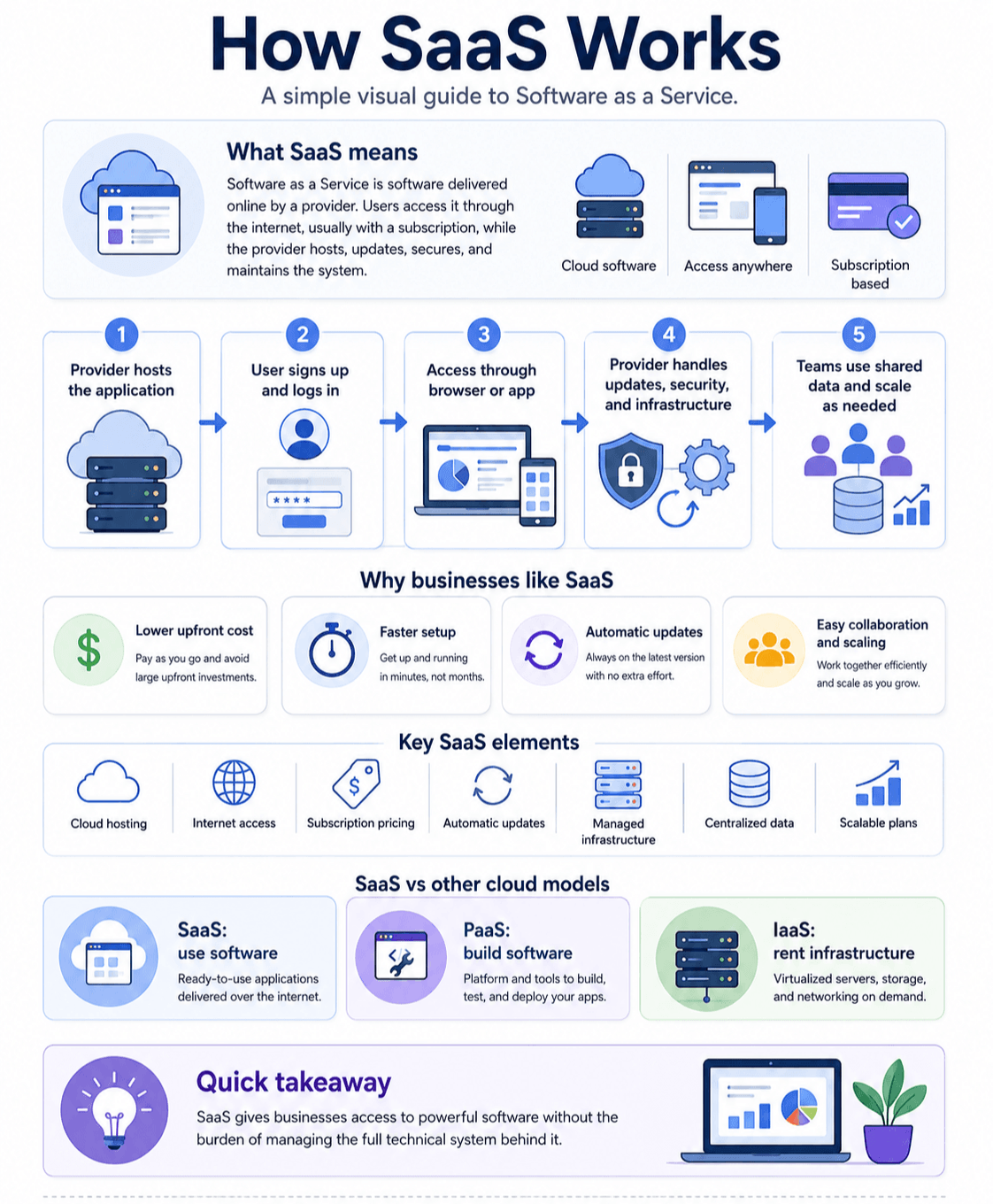
Infographic
Final Thoughts
SaaS means Software as a Service, but the bigger idea is access. It gives people and businesses access to useful software without the burden of managing the entire technical system behind it.
That is why SaaS is everywhere. It helps teams communicate, sell, design, analyze, support customers, manage money, create content, run stores, and build better workflows. It makes software more flexible and more approachable.
Still, smart SaaS adoption requires judgment. The right tool can save hours, improve decisions, and help a business grow. The wrong tool can become another subscription nobody uses.
Start with the problem. Choose carefully. Test with real work. Keep what creates value. Remove what does not. That is how SaaS becomes more than a monthly bill. It becomes part of a better way to work.
FAQ
SaaS means Software as a Service. It is software that users access online, usually through a subscription, while the provider hosts, updates, and maintains the application.
Software as a Service means the customer uses software as an online service instead of installing and maintaining it locally. The provider manages the infrastructure, updates, availability, and technical operations.
SaaS works by hosting software in the cloud and providing users with access via the internet. Customers log in through a browser or app, while the provider manages the servers, maintenance, security, and updates.
Common SaaS examples include CRM platforms, email tools, project management apps, accounting software, ecommerce platforms, video meeting tools, cloud storage, help desk software, and design platforms.
SaaS is a type of cloud software. It specifically refers to complete software applications delivered online as a service. Not every cloud service is SaaS, because cloud computing also includes infrastructure and development platforms.
Traditional software is usually installed on a local computer or company server. SaaS is hosted by the provider and accessed online. SaaS usually includes ongoing updates, subscription pricing, and managed infrastructure.
Companies use SaaS because it is easy to access, faster to deploy, scalable, and often less expensive to start than traditional software. It also reduces the need for internal maintenance and manual updates.
Possible disadvantages include subscription costs over time, reliance on internet access, vendor dependency, data privacy concerns, and integration challenges. These risks can be managed by choosing reputable providers and regularly reviewing usage.